The H+ icon means your Android phone is using HSPA+, a faster form of 3G-era mobile data that still trails 4G LTE and 5G.
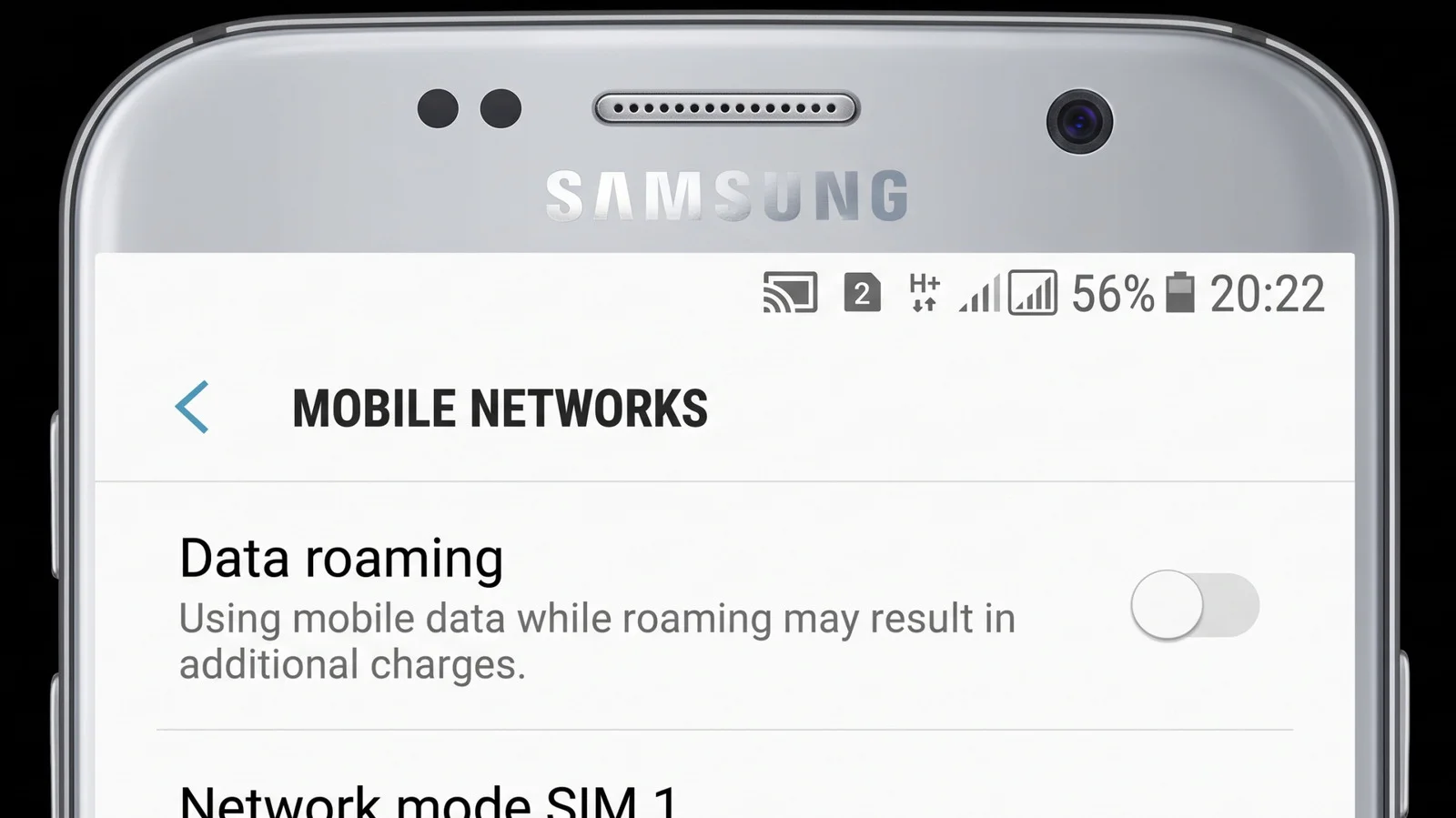
The H+ icon in an Android status bar means the phone is connected to an HSPA+ mobile data network. It can help explain why a connection feels slower than expected: HSPA+ improved on earlier 3G services, but its speeds sit well below the figures associated with 4G LTE and 5G. The icon tells you the type of network connection in use; it doesn't tell you exactly how fast your phone will load a page or download a file.
HSPA+ stands for Evolved High Speed Packet Access. It belongs to the HSPA family of digital data services associated with 3G and 4G networks, and Android displays it in the status bar alongside familiar 3G, 4G, or 5G indicators. Some phones also show arrows beside the label to indicate data moving up and down. Those arrows describe network activity, not a speed rating.
A similar “H” icon commonly indicates an HSDPA connection. HSDPA means High Speed Downlink Packet Access and is another HSPA technology. The names are close, and both labels point to network technologies in the same broader family, but H+ identifies HSPA+ specifically.
Android’s status bar can show other network details, too. A 4G or 5G label identifies the connection type reported by the phone, while an “R” can indicate that the device is roaming outside its usual service area. These symbols are quick clues, not a full diagnosis of service quality. A familiar label doesn't guarantee a strong signal or a fast connection.
HSPA+ speeds compared with newer networks
HSPA connections can reach theoretical data rates of about 21 Mbps, while HSPA+ doubles that ceiling to around 42 Mbps. Typical download speeds are lower, generally ranging from 3.5 to 14 Mbps; in some areas, including northern Canada, HSPA speeds can fall to roughly 1.5 Mbps. The difference between a theoretical ceiling and a typical result matters: a maximum describes what a technology may support under favorable conditions, not what every user should expect.
Those rates beat older 3G service, which tops out at about 7.2 Mbps for downloads and 2 Mbps for uploads. But the gap widens with newer standards: 4G LTE can reach 150 Mbps down and 50 Mbps up, while LTE-Advanced can reach 300 Mbps down and 150 Mbps up. The figures cited for 5G are much higher, at up to 20 Gbps for downloads and 10 Gbps for uploads. These comparisons put HSPA+ in context, though they don't guarantee that a newer network will deliver its headline maximum in everyday use.
Speed isn't the only part of the experience. Upload performance, latency, and the amount of bandwidth available can affect how responsive a connection feels, even when a single download speed figure looks adequate. A page that loads slowly, for example, may reflect conditions beyond the network label itself. The icon is a starting point for understanding the connection, not a measurement of every task you ask the phone to perform.
Why the H+ icon doesn't tell the whole story
These are maximum potential speeds, not a promise of what a phone will deliver. Actual performance depends on factors such as latency, network congestion, bandwidth use, and the carrier. Similar mobile networks can produce different results as conditions change, so two connections displaying the same icon may not feel identical. And the status bar generally offers a broad category rather than a detailed account of what is limiting performance.
Here's the thing: seeing H+ can explain why a phone isn't matching expectations set by LTE or 5G figures, but it can't establish the cause of a slow connection on its own. Congestion or limited bandwidth may matter, and the connection's location within the carrier's service area can shape what the user experiences. (And this is the part most people overlook.) The icon reports the connected network type; it doesn't certify the quality of the connection.
If you're working in this space, that distinction matters when explaining performance to users: status icons simplify a complicated connection into a small label. They make network changes easy to spot, yet leave out the conditions that determine actual speed. A useful troubleshooting step is to read H+ as evidence of an HSPA+ connection, then consider the broader service conditions rather than treating the symbol as a speed test.
What H+ means for your connection
When H+ appears, the practical takeaway is that the phone has connected to HSPA+—a faster step beyond basic 3G, with performance that may lag well behind modern LTE and 5G service. If the phone also shows data arrows, they're a sign that data is moving, not that it’s moving quickly. The label can help set expectations, especially when a device isn't connected to the network type you expected.
This is more significant than it looks. A small status icon can clarify whether a phone is using an older mobile data technology, but the numbers attached to network standards need careful reading: theoretical peaks and typical performance aren't interchangeable. HSPA+ still represents an improvement over earlier 3G service. In practice, though, the H+ symbol is best read as a useful clue about the connection—not a verdict on what you'll get from it.
Faster on paper. Variable in use.

Discussion
Sign in to join the discussion.